How to reduce the cost of generating an Image
For the sake of this discussion, we’ll not go into the personal cost I had to pay and keep this technical.
Think of reducing cost as increasing throughput of the model on a given hardware. Sometimes improving latencies for a model - running it faster - also corelates to improving throughput and thus reducing cost. Whenever that correlation is implied do note that the primary objective of the approaches listed in the doc is to improve throughput (and cost) and not latency.
There are different model architectures that support different mechanisms to reduce costs. And there are different model architectures that solve the task of generating an image. There are lot of common approaches that apply regardless of the model architecture.
decide a few models
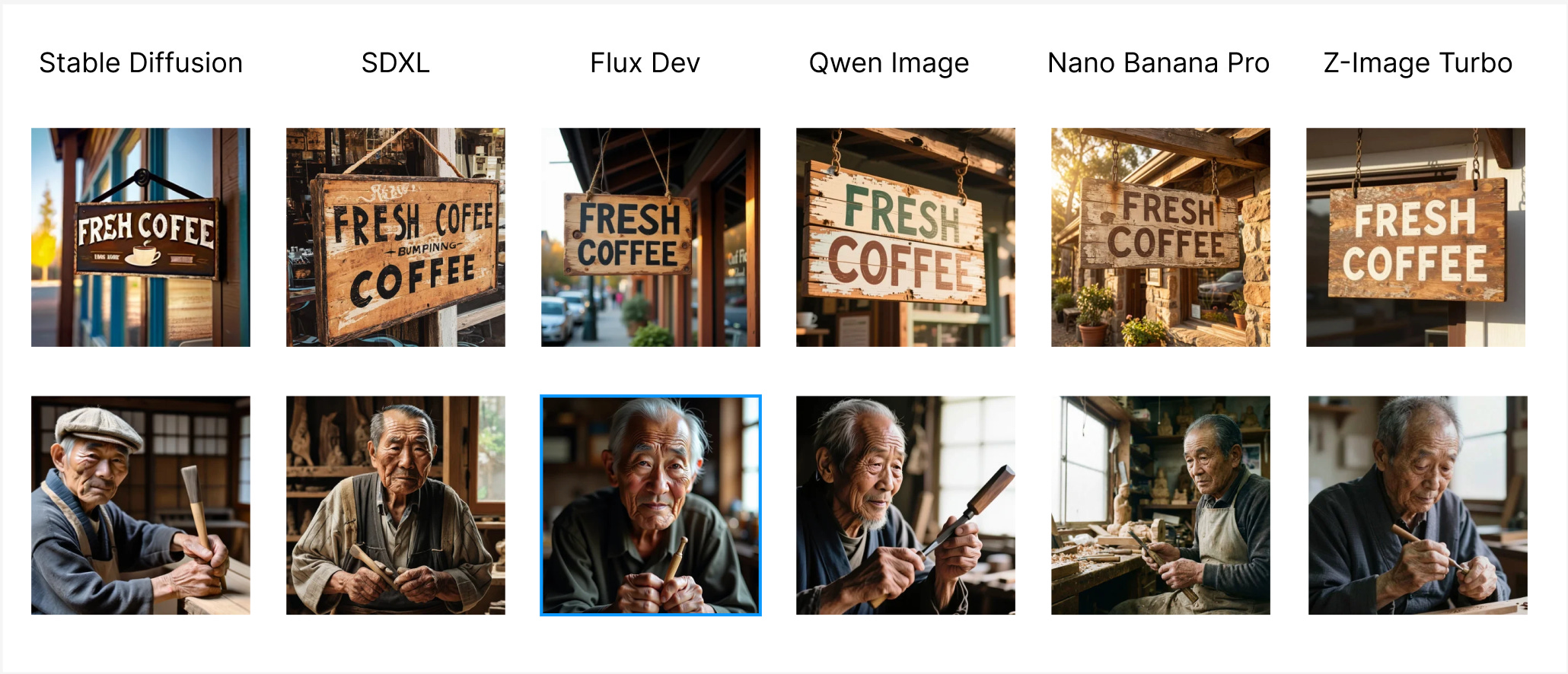
Comparing SD (2022), SDXL (2023), Flux Dev (2024), Qwen Image (2025), Nano Banana Pro (2025), Z-Image Turbo (late 2025) for a few use cases showcasing how far we have come in the last 3 years. Our definition of good output has changed with every massive release, and the frontier models have become bigger and bigger.
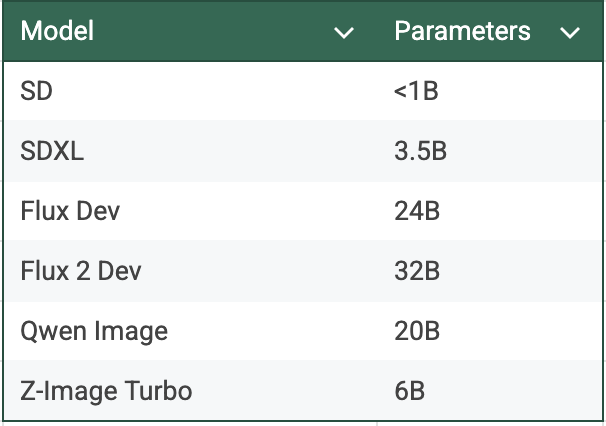
What this this translates is the minimum machine size (or rather GPU) required to run a model has changed as well. Stable Diffusion could run on CPU. SDXL worked on a L4 GPU. Flux, Qwen needs a bigger machine to run, the latest RTX 6000 Pro / G4 or an A100 at least. There are inference frameworks that support quantized version of those on L4. What this showcase is, you get what you pay for. Each iteration needs more GPU to run than the previous one, while also being that better in the quality of image & the intelligence of model.
The choice can never be run the best & biggest model for any task, even though it would perform exceptional on it; but it has to be relevant to your task if you care about cost. You can get almost the same level of realism by hosting Qwen Image & Z-Image Turbo then paying 4 c / image for Nano Banana Pro.
Every individual would have its own take of what is the right accuracy or realism they love about an image. It becomes clearer that a frontier proprietary model from a closed source lab looks better than the Open Source one that is catching up to the frontier. I haven’t found a single set of metrics to quantify what model works best for a task with the tradeoffs of cost. Few such things for deciding are Mean Opinion Score, how impacted are your users if you move them from Model 1 to slightly cheaper Model 2.
building on top of a model
While picking the vanilla model is one option, another is that the expectation you seek from a model can be brought by trickier means. Like realism you chase can brought by clever preprocessing of images or by additional improvement to a model via the means of a Control Net or LORA on a cheaper model iteration.
If you truly care about reducing cost, the problem statement goes deeper than just pick this model, apply the same optimizations and run on this GPU.
Every model that is released in the open source, has given its users the option to extend it. Fine tune it on your datasets. Or condition it your liking. And even making it faster at a tiny drop in accuracy metrics. A vanilla Qwen Image lacks the realism of Nano Banana Pro & Z-Image Turbo. Everyone’s aware of that and that’s why you’d see someone on the internet train a realism LORA for it.
This is not new. In fact, it started with the OG series of Stable Diffusion. The original Stable Diffusion were too generalized and thus lacking. Developers and passionate hobbyists built an anime SD, multiple sets of realistic SD, someone released weights for a model that did better western, wild west images while others did it for futuristic cyber punk.
The issue of having deformities on a human were solved to an extent by allowing the model to not imagine what the human anatomy is but by providing a pose or an existing image to learn from (more like be conditioned on). This was done via Control Nets & IP Adapters.
There are other preprocessing tricks - if you want to generate the most realistic looking photo of 200 cars driving in Georgia (the country), you can work with few background images of places Georgia, these backgrounds either real or imagined from the most realistic generative models and use a cheaper model to place the cars there.
now comes the optimizations
We’ll go into quantization, tricks like “torch.compile”, detaching CPU work from GPU, choice of cost to performance numbers for a GPU, step sizes, batch sizes and the most important thing being choice of inference framework.
quantization
Quantization is the process of converting a large set of values (high precision) to a smaller, discrete set of values (low precision). In our ML models, this typically means converting 32-bit floating-point weights and activations into 16-bit, 8-bit or even 4-bit integers.
Quantization’s obvious concern is the loss of data and its perceived loss in accuracy because of that. There are approaches to handle them and a quantized model usually ends up around the same accuracy range in comparison to the original.
Quantization helps you in two ways -
reducing the size of your model, thus making it faster to load in memory and with a smaller footprint
improving the time for computations
For image models, most of the inference engines will give you the ability to use quantization. Diffusers, ComfyUI, TensorRT, deepcache all have that option. My favorite is Nunchaku, it utilizes SVDQuant , which quantizes both weights and activations to 4-bit integers (INT4) or 4-bit floats. And the engineers over at this project have already done this process for a wide range of models.
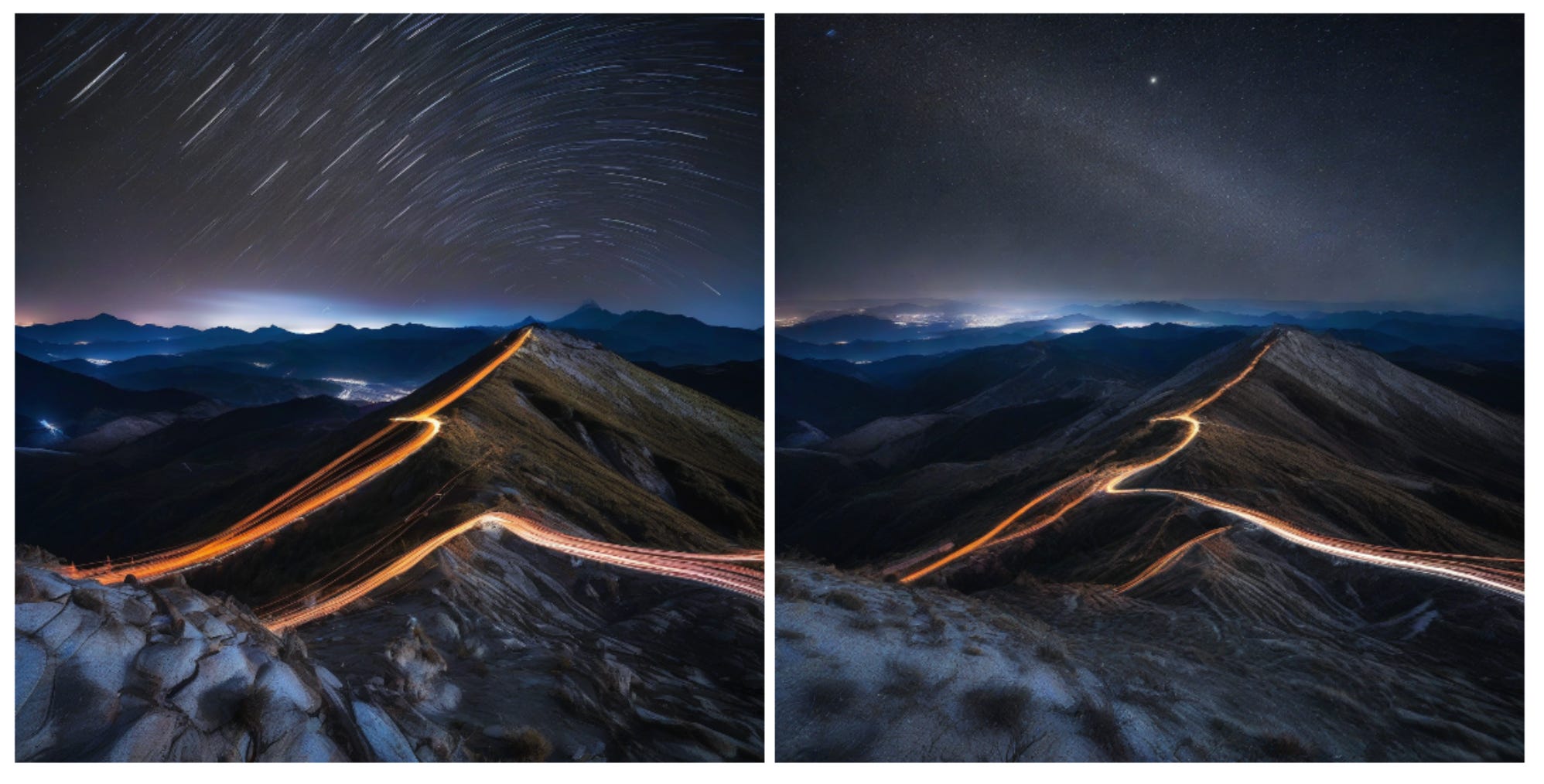 For SDXL - Left - FP16 output, Right - FP8+INT8 output via deepcache
You can use FID (if you have large amount of data), peak signal-to-noise ratio (PSNR), or structural similarity index measure (SSIM). A simple CLIP score would also work.
HuggingFace’s compiled report on inference optimizations. Just running it with bfloat16 precision reduces the generation time by 37%, while the dynamic quantization route reduces it by 66% or a 3X speed up.
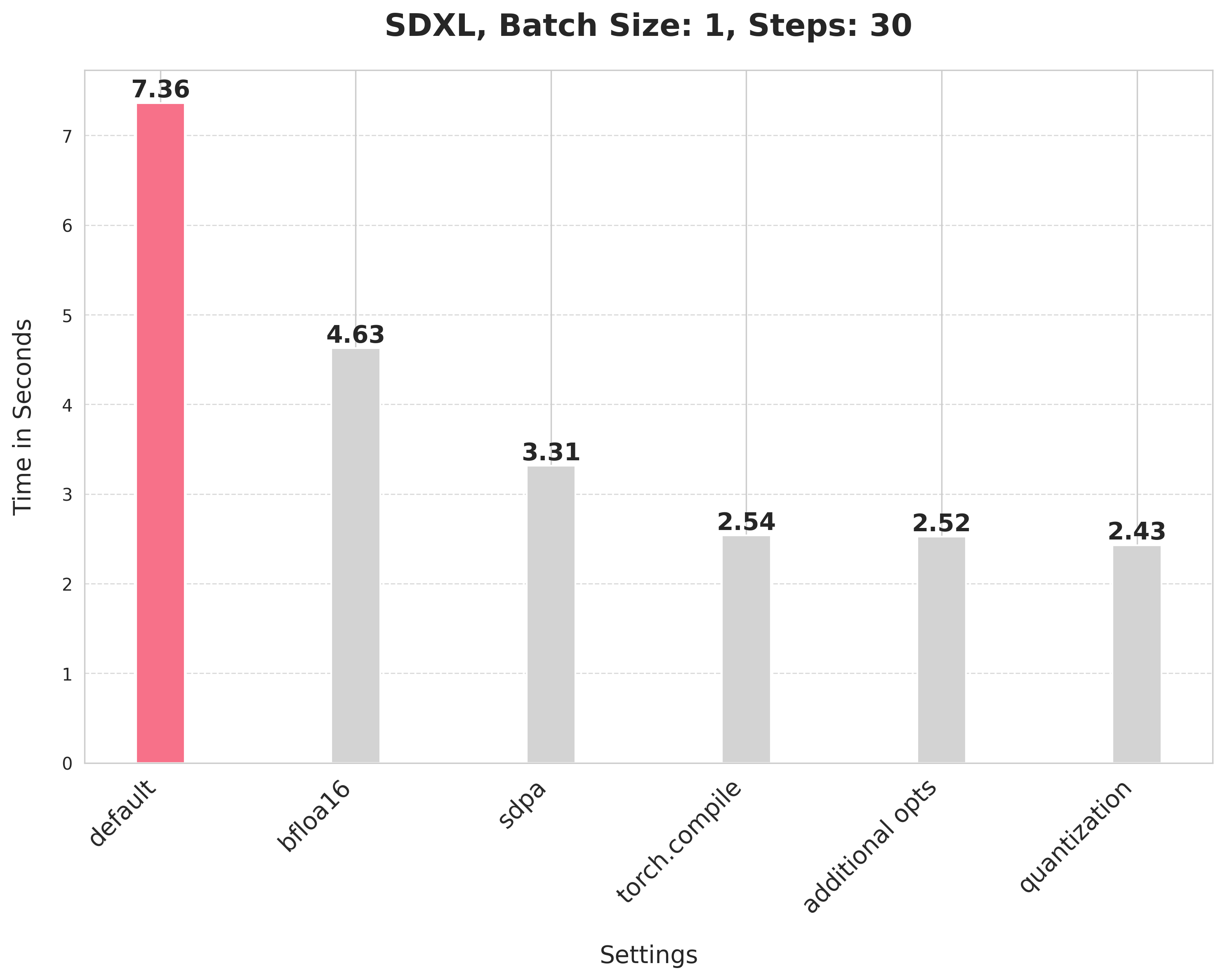 SDXL Optimization Levers
steps
Image Generation models (like UNET, DiT architectures) start with a “noise” & then performs denoising, refining the image into something that looks coherent. These denoising operations are referred to as steps.
An SDXL model typically works well with 30+ steps. Think of inference as a multiplier of how many steps you choose to run, lower the steps, lower the accuracy.
However, this doesn’t stop there. The community always gives. We have SDXL Lightning model that delivers on the same output as SDXL but with 10x lesser steps (5 is optimal). There’s SDXL Turbo that generates an image in 1 or 2 steps.
SDXL Lightning is special. It uses Progressive Adversarial Diffusion Distillation. It has a student teacher model arch, where the Student model tries to predict the Teacher (original model)’s steps at once. It also uses the diffusion model’s UNET encoder as backbone for its discriminator which makes it generate high quality images closer to what the original model would generate. SDXL Turbo on the other hand is very limited in what it can generate (resolution, quality).
The exact same offering exists for Qwen Image models; Qwen Image Edit model typically works with 30-50 steps, but has extensions in the form of Lightning LoRAs that makes it generate a decent image in 4 or 8 steps. Similar approach is implemented as above to make this possible.
You can reduce the steps for an original model, to reduce the time taken, and increase throughput. But it comes at the cost of accuracy. While you can identify the right extension to the original model and work with fewer steps.
batches
By increasing the batch size, you load the model weights once but use them to compute multiple images simultaneously. You load 20GB of weights to compute 1 image. That’s memory bound. But you can generate for a batch of N (compute bound) and reduce the cost per image significantly.
torch.compile
This was introduced in PyTorch 2.0, torch.compile is a compiler wrapper that leverages a new stack to move from Eager Mode (step-by-step Python execution) to Graph Mode (optimized, fused execution) without requiring a rewrite of the model code. This works because of TorchDynamo or Graph Capture, it intercepts & looks ahead on all computation into a FX Graph. If the code contains “un-compilable” Python, Dynamo triggers a graph break, executing that portion in Eager Mode and resuming compilation for the next segment. PyTorch takes the FX Graph and generates specialized Triton kernels. And along with that comes the goodness of operator fusion. A simple looking function doing so many things under the hood.
As seen above in the huggingface report, there’s a signifcant speedup that torch.compile provides.
inference frameworks
Last decade has saw some high performance ML inference engines built. One of those is TensorRT. It is not as simple as run this model in TensorRT, but a model has to be ported into it. You can use a model packaged in ONNX format or convert a model via TensorRT API and both requires work. Especially for complicated architectures. And that’s why its uncommon for people to just use this vs say a “diffusers” library.
Some reasons for TensorRT to perform efficiently are quantization, tensor fusion (combining squential operations into 1 CUDA Kernel), layer fusion (identifies layers that perform same operations into 1 kernel).
For images, we also have Nunchaku. Introduced in ICLR 2025, it leverages SVD Quant to run 4 bit NN.
cleaner separation of GPU and CPU; and GPUs
Often times on production, for sake of simplicity you would place code that runs on CPU and GPU together. If we are optimizing for that last $ then the first thing you should do is break out the CPU part out of the GPU code.
Some times its simple preprocessing you do on CPU. There would be code that you could run on GPU which you aren’t. There’s going to be code that moves your predictions from 1 model into another and CPU gets involved there. But there’s also code that has got nothing to do with GPU or can’t be ported to GPU. Like an I/O call. One should pick up what they can and ensure that GPU operation takes up most if not all of the time the request is getting processed.
The cleanest way to do this would be to host the model in an inference framework. Not diffusers or ComfyUI or even PyTorch, but rather run it with TensorRT like framework. That way, anything outside that execution can literally can remain outside the GPU machine.
An SDXL model can seem like 1 model, but is comprised of multiple models, chained 1 after another. Sometimes your preprocessing also would add onto these chained models. There’s simple math to what would be the best route, to host these indvidual models on GPUs (and ensure that these individual models are able to utilize 100% of the GPU cores) or to club them together and maximise the utilization of the GPU it runs on (avoiding a fragmentation + network problem).
You can also accomodate more models into 1 GPU by swapping in and out when needed.
There’s also the issue of being compute bound or memory bound which restricts us from utilizing the GPU to its full extent. A large parameter model might occupy most of the GPU memory but only a fraction of its compute cycles. Quantization also helps here.
There are certain optimizations that are custom to the model + GPU it runs on like SageAttention, TeaCache, DeepCache, and Flash Attention for models with Attention layer.
Or for the VAE stage, which typically would be memory bound, can be done with Tiled VAE (making it compute bound) or the very latest TinyVAE.
Our ability to have a mechanism to test how well you utilize a GPU for your model, also helps us extend the same exercise into multiple GPU families and thus be able to take an informed call based on a GPU’s cost to performance number for your workload that we see in reality.
In the end, its the trade offs we live with.